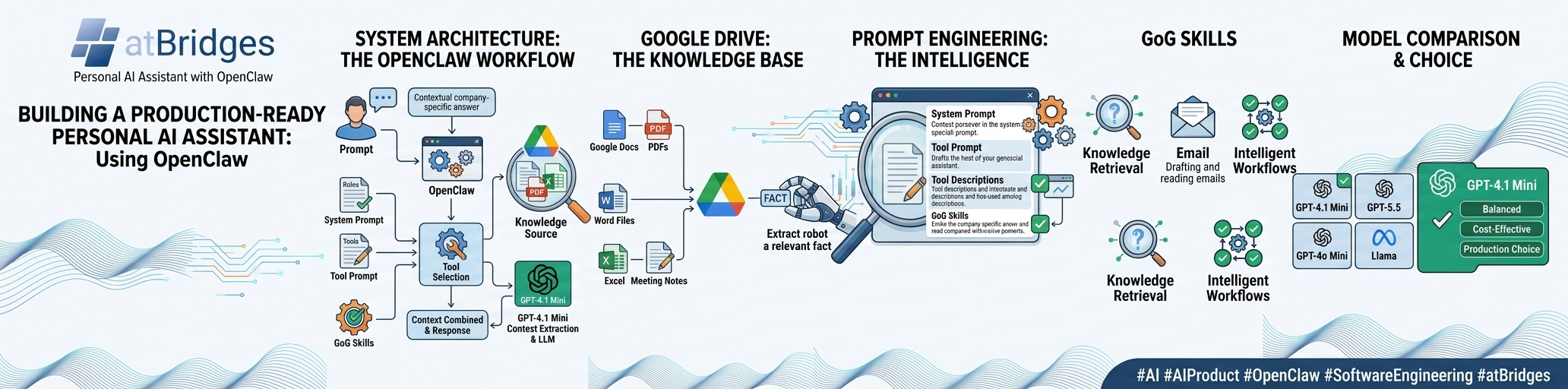
From searching thousands of documents to drafting emails and executing custom GoG skills — here's how I built a production-ready personal AI assistant using OpenClaw.
Introduction
Large Language Models (LLMs) have completely changed how we interact with information. Most AI assistants today can answer general questions remarkably well, but they often fall short when it comes to organization-specific knowledge and real-world task execution.
If you ask ChatGPT:
"What is AkraHealth?"
it has no knowledge of your internal company documents unless you manually provide the context.
In reality, important information is scattered across:
Finding the right document often takes longer than getting the actual answer.
I wanted to eliminate this problem.
Instead of building another chatbot, I built a Personal AI Assistant capable of understanding my entire Google Drive, retrieving information intelligently, executing predefined GoG (Goal-Oriented Guidance) skills, and performing productivity tasks like reading and drafting emails.
The foundation of this assistant is OpenClaw, customized with carefully engineered prompts, tools, and workflows.
Project Goal
The objective was simple:
Build an AI assistant that behaves like a knowledgeable teammate rather than just another chatbot.
The assistant should be able to:
✅ Search the complete Google Drive
✅ Read Google Docs
✅ Read Microsoft Word documents
✅ Read Excel spreadsheets
✅ Understand PDFs
✅ Answer organization-specific questions
✅ Draft professional emails
✅ Read existing emails
✅ Execute predefined GoG commands
✅ Follow structured workflows
Instead of asking users to upload documents every time, the assistant already knows where to search.
System Architecture
The overall architecture is intentionally simple but highly effective.
| Stage | Description |
|---|---|
| User Prompt | User submits a question or request to the AI assistant. |
| OpenClaw Assistant | Receives the prompt and orchestrates the complete workflow. |
| System Prompt | Defines the assistant's behavior, rules, and response style. |
| Tool Prompt | Guides the AI in selecting and using the appropriate tools. |
| GoG Skills | Executes predefined Goal-Oriented Guidance (GoG) workflows. |
| Tool Selection | Determines which tools or workflows should be invoked. |
| Google Drive Search | Searches relevant documents stored in Google Drive. |
| Knowledge Sources | Google Docs, Word Documents, Excel Sheets, PDFs, and Internal Documentation. |
| Context Extraction | Retrieves and combines relevant information from multiple documents. |
| GPT-4.1 Mini | Processes the retrieved context and generates an accurate response. |
| Final AI Response | Returns a contextual, organization-specific answer to the user. |
Google Drive as the Knowledge Base
One of the biggest design decisions was choosing Google Drive as the primary knowledge repository.
Instead of migrating documents into another database, I leveraged the existing documentation that teams already maintain.
The knowledge base includes:
Whenever a user asks a question, the assistant searches across all relevant files, extracts the necessary information, combines evidence from multiple sources, and generates a single contextual response.
Users never need to know which document contains the answer.
Example Workflow
Imagine asking the assistant:
"What is AkraHealth?"
Instead of relying only on the language model's memory, the assistant performs several intelligent steps.
Step 1
Search Google Drive.
Step 2
Locate all relevant documents.
Step 3
Read:
Step 4
Merge information from multiple sources.
Step 5
Generate one accurate response.
The entire process happens automatically within seconds.
Prompt Engineering
One of the most important lessons from this project was that the quality of the assistant depends far more on prompt engineering than on the language model itself.
I spent significant time designing:
The objective was to ensure the assistant always knew:
This dramatically improved consistency.
GoG Skills
The assistant isn't limited to answering questions.
I predefined multiple GoG (Goal-Oriented Guidance) skills that allow it to execute structured workflows.
Current capabilities include:
Knowledge Retrieval
Email Assistant
Intelligent Workflows
This transforms the assistant from a conversational chatbot into an actual productivity assistant.
Why I Chose GPT-4.1 Mini
Selecting the right model required extensive experimentation.
I evaluated multiple OpenAI and open-source models before deciding on GPT-4.1 Mini.
The decision wasn't based solely on benchmark scores.
I considered:
Model Comparison
GPT-4.1 Mini
This became the ideal balance between intelligence and operational cost.
Strengths
For my workflow, GPT-4.1 Mini consistently selected the correct tools and generated reliable responses.
GPT-5.5
GPT-5.5 delivered exceptional reasoning capabilities.
For highly complex tasks, it clearly outperformed smaller models.
However, my assistant performs a large number of tool calls and document retrieval operations throughout the day.
In production, API cost becomes an important factor.
Although GPT-5.5 produced excellent results, the improvement over GPT-4.1 Mini wasn't significant enough for my use case to justify the additional cost.
GPT-4o Mini
GPT-4o Mini is impressively fast.
However, during testing I noticed:
For simple conversations it performs well.
For an autonomous assistant that must choose the correct tools and execute business logic, I preferred GPT-4.1 Mini.
Llama Models
I also experimented with several Llama variants.
While they are capable open-source models, I observed:
They worked reasonably well for general conversations but required considerably more tuning for production-quality task execution.
Key Lessons Learned
Building an AI assistant taught me that success depends on the complete architecture rather than the language model alone.
The biggest improvements came from:
The language model is only one component.
The intelligence comes from how everything works together.
Future Improvements
This is only the beginning.
Some features I plan to add include:
Final Thoughts
Building this assistant reinforced an important lesson:
A great AI assistant is not built by choosing the biggest model. It is built by combining the right model with well-designed prompts, reliable tools, and a strong knowledge retrieval pipeline.
Using OpenClaw, a Google Drive knowledge base, custom GoG skills, and GPT-4.1 Mini, I created an assistant that can:
For my production environment, GPT-4.1 Mini provided the best balance of reasoning quality, speed, reliability, and cost.
Sometimes, the best engineering decision isn't choosing the most powerful model—it's choosing the one that delivers the greatest value for your specific use case.
Thank You
If you're building AI assistants with OpenClaw, Retrieval-Augmented Generation (RAG), MCP, or agentic workflows, I'd love to connect and exchange ideas. The ecosystem is evolving rapidly, and there's plenty we can learn by sharing real-world experiences.
Happy Building! 🚀